


Revenue Recovery: automated failed payment recovery in EPD Commerce
Most commerce platforms tell you a payment failed. EPD Commerce does something about it. Revenue Recovery is the automated recovery layer built into EPD Commerce that retries failed payments on a configurable schedule, routes each failure through a strategy matched to its decline reason, and contacts the customer at the right time without any manual intervention.
What Revenue Recovery actually does
Failed payments are the largest silent revenue leak in subscription businesses. A card expires. A soft decline hits on renewal day. A one-time order fails at checkout. On most platforms, a human has to notice, decide on a retry, write an email, and hope the customer responds before the next cycle. Most operators do not catch it in time.
Revenue Recovery catches it automatically.
When a payment fails, the system evaluates the decline reason, assigns it to the appropriate recovery strategy, begins the retry sequence, and triggers the corresponding customer communication. All of this runs inside rules you configure once. Every failed payment from that point forward runs through the same logic.
What shipped in this release
Revenue Recovery ships as a full stack of configurable components:
- Retry & Communication Logic: global rules covering retry frequency, the length of the retry window, maximum retries per week, minimum time between retries, maximum customer emails per week, quiet hours, operating days, and what happens when a recovery campaign is exhausted (suspend, wait for next cycle, or stop collection)
- Recovery Templates: five named strategies for failed subscription payments, each mapped to a specific decline reason, with its own retry cadence and email sequence
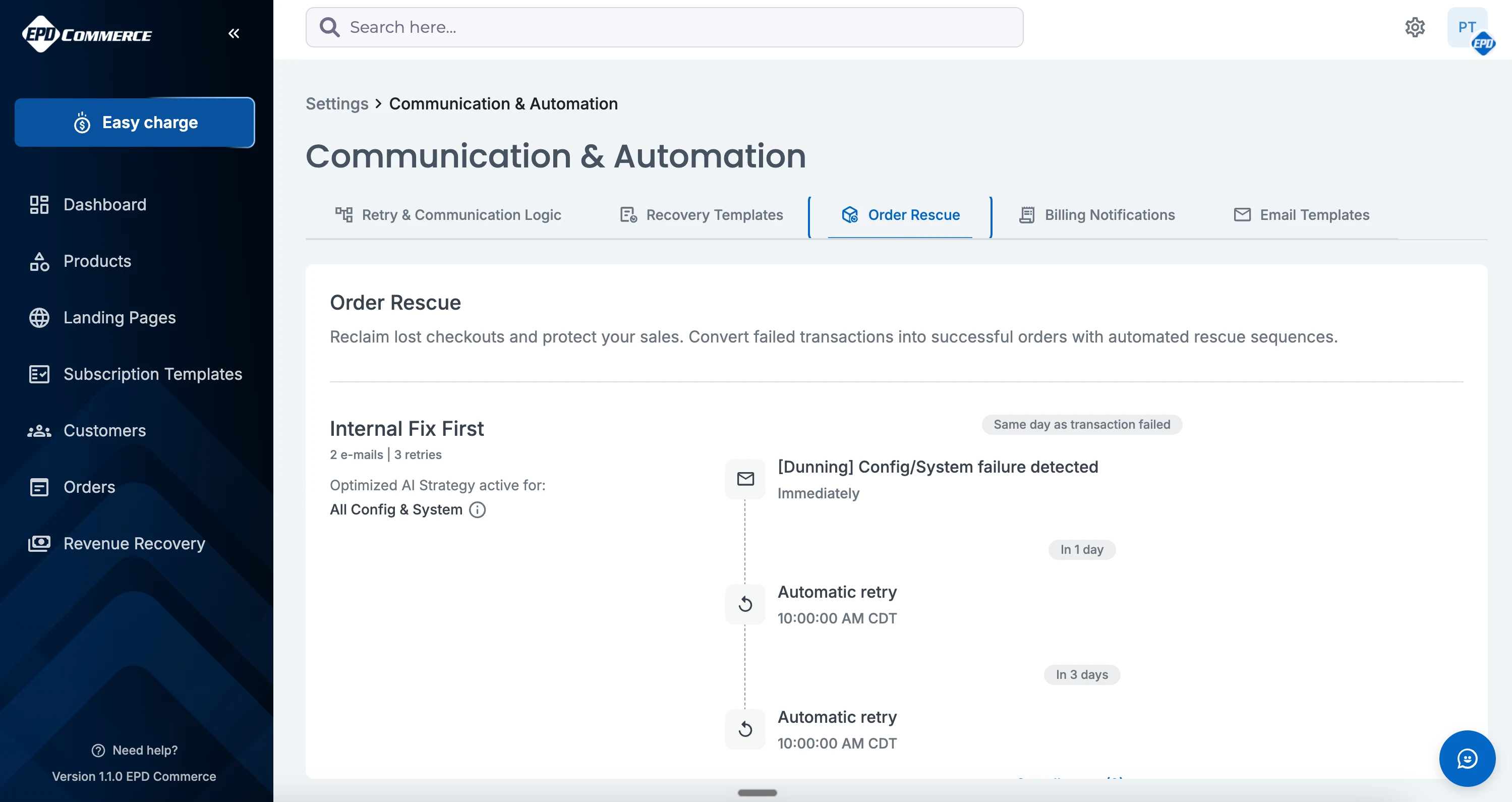
- Order Rescue: the same strategy patterns applied to failed one-time orders
- Optimized AI Strategy: a per-template toggle that automatically routes each failed payment to the correct strategy based on the decline reason
- Billing Notifications: 14+ lifecycle notifications with individual toggles covering events from subscription activation through chargeback receipt
- Email Templates: a library of pre-built messages that power every recovery campaign, editable and extendable
- Revenue Recovery dashboard: KPIs showing total failed payments, revenue at risk, recovery rate, and upcoming retries, plus a filterable table of every failed transaction
How Recovery Templates work
Every Recovery Template is a named strategy tied to a specific class of decline. EPD Commerce ships five:
- Persistent Retry: for soft declines. Retries multiple times over several days with progressive customer communication.
- Update Card First: for card data errors. Skips retries and focuses on prompting the customer to update their payment method.
- Internal Fix First: for configuration and system issues. Retries after a delay while the underlying issue is resolved.
- No Retry, Verify Required: for fraud and security declines. Contacts the customer directly with a required action before any retry.
- Switch Method & Notify: for account status issues. Retries once, then prompts the customer to switch payment methods.
Merchants can use any template as shipped, edit the cadence and messaging, or build a custom strategy from scratch. Templates are not black boxes: every step is visible and configurable.
Optimized AI Strategy and manual routing
Each Recovery Template includes an Optimized AI Strategy toggle. When active, EPD Commerce reads the decline reason and assigns the failed payment to the correct template automatically. When off, the merchant controls routing directly.
This is not a binary choice between automation and control. Both modes run within the same Retry & Communication Logic rules. Turning on Optimized AI Strategy means the platform makes the routing decision; turning it off means you do.
Order Rescue for one-time payments
Subscription failures are the primary use case, but failed one-time orders are just as recoverable. Order Rescue applies the same five strategy patterns to individual failed orders. Lost checkouts and failed purchases route through the same configurable logic rather than disappearing into a failed-order report nobody checks.
The Revenue Recovery dashboard
A dedicated page in EPD Commerce surfaces the full picture: how many payments have failed, how much revenue is at risk, what the current recovery rate is, and what retries are scheduled for the next 24 hours. Every failed transaction is in the filterable table. Operators can drill into any specific payment, see its recovery status, and understand exactly what the system is doing about it.
The dashboard makes Revenue Recovery auditable, not just automatic.
Availability
Revenue Recovery is live in EPD Commerce in beta, with broader rollout underway. Merchants on Easy Pay Direct can request early access through their Certified Payment Specialist. Full availability follows as EPD Commerce rolls out broadly. Get Access at epd.com
FAQ
What is Revenue Recovery in EPD Commerce?
Revenue Recovery is an automated failed-payment recovery system built into EPD Commerce. When a subscription or one-time order payment fails, it retries the transaction on a merchant-configured schedule, routes the recovery through a strategy matched to the decline reason, and contacts the customer with the appropriate message at the right time. No manual intervention is required.
What is the difference between Recovery Templates and Order Rescue?
Recovery Templates handle failed subscription payments. Order Rescue handles failed one-time orders. Both use the same five strategy patterns and run inside the same global Retry & Communication Logic rules. The separation exists because subscription failures and one-time order failures have different retry contexts, but the configuration approach is identical.
What does Optimized AI Strategy do?
Optimized AI Strategy is a per-template toggle in Revenue Recovery. When active, EPD Commerce reads the decline reason for each failed payment and automatically routes it to the Recovery Template best matched to that failure type. When off, the merchant assigns routing manually. Both modes operate within the global Retry & Communication Logic rules the merchant sets.
Can merchants customize the retry and communication rules?
Yes. Retry & Communication Logic lets merchants set the total retry window, maximum retries per week, minimum time between retries, maximum customer emails per week, quiet hours, operating days, and what happens when a campaign is exhausted. These global rules apply to every recovery campaign. Individual Recovery Templates then add their own cadence and email sequence on top of those rules.
What does the Revenue Recovery dashboard show?
The Revenue Recovery dashboard shows total failed payments, revenue at risk, current recovery rate, and retries scheduled for the next 24 hours. It includes a filterable table of every failed transaction so merchants can see the status, strategy, and next action for any specific payment.